Are you a small business requiring quick remote consultation?
We are currently using Microsoft Teams for meetings & Microsoft Quick Assistance. If you do not have Microsoft Teams business please let us know on the booking form and how we can contact you.
You can either use the Windows installed application or use the following website if you do not have quick assist installed.
List of services we can help:
Navigating around Windows 11
Bitwarden Password Manager
Helping to migrate to Microsoft 365
Helping recommending to replace computer hardware.
Microsoft 365 Dashboard
Microsoft 365 / Entra ID / Azure Systems, back end systems
Navigating around Claude AI and Copilot AI
Setting up DMARC, SPF, DKIM for Microsoft 365
Documentation (Optional add on). Please note we can create new documentation from the consultation services if required. However if you like this optional service please visit: Knowledgebase Documentation – IT Star Services
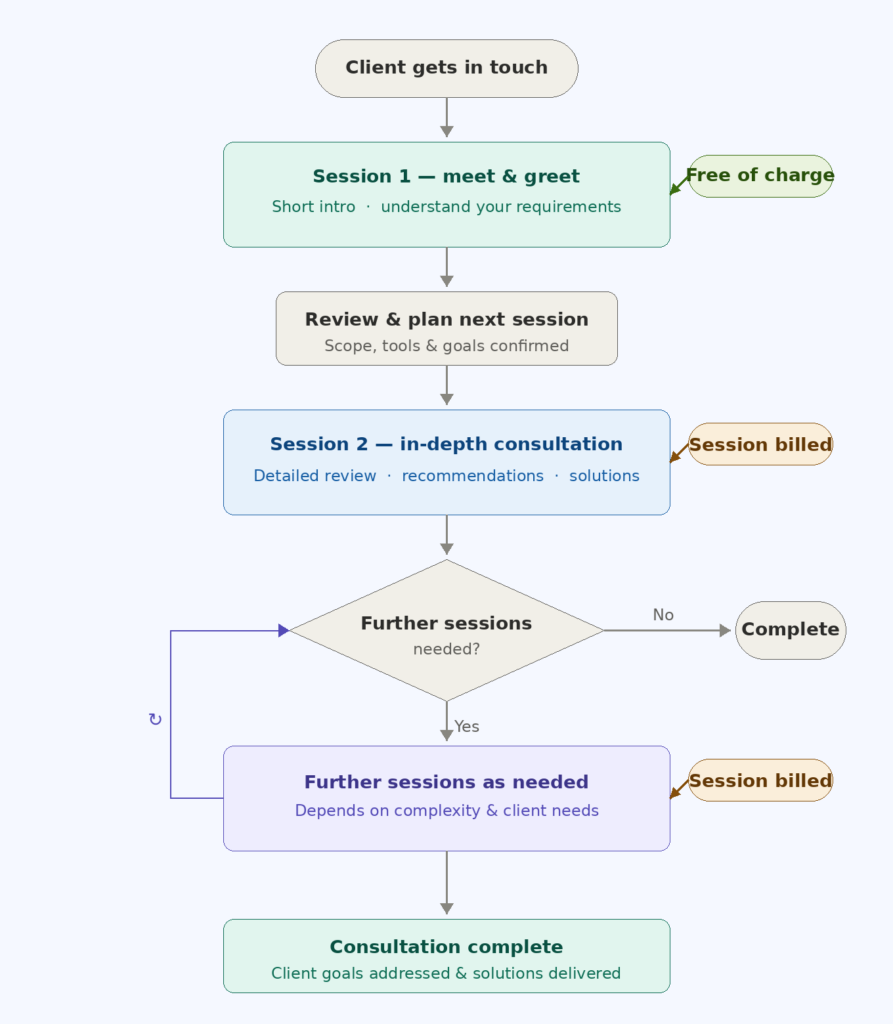
What to expect from a session
All sessions are conducted remotely via Microsoft Teams — no travel needed. Here is how it works:
📌 Not sure which service you need? Start with a Free Meet & Greet and we will point you in the right direction.
Prerequisites
- Please let us know what you would like for us to help you on.
- If you require small business migration to Microsoft 365 and you have a existing website. Please make sure we can help you with migrating. However your current webhosting provider and DNS team may need to help us. We can help you to migrate to Microsoft 365 system if your domain is currently with Godaddy.
- If you opt for Microsoft 365 personal you will not need to know about the business versions.
- For each session please start a booking. Our booking system is coming soon. Our bookings system is hosted with Microsoft 365 bookings page. SO the URL will be different. A separate link will appear here.
- Once the bookings Page form has been entered please make sure you join the session on required date and time. Microsoft 365 will send out a email to you automatically for the Teams session booking.
- Once you are on the call we may need to get you to arrange a remote session. Please make sure you know how to use the Windows application or the Microsoft 365 web version:
Instructions accessing Quick Assist application on Windows: Quick Assist | Microsoft Windows
Quick Assist Web if application is not installed: https://aka.ms/quickassist
Disclaimer
We may try and help with these areas in our documentation. However it is important to note we are not the application vendor. This means applications can get updated by larger companies.